
· · Lucie Dewaleyne · Blog · 6 min read
Beyond Claude Code: Why conversion requires more than AI code generation
TL;DR: an AI-generated site works, but it doesn’t convert better than the market average. Without product strategy, UX and real user testing, AI produces an «average» site that can end up costing you: lost traffic, lost conversions, even lost revenue.
| Metric | Data |
| Conversion rate increase from real UX investment (Forrester) | up to +400% |
| Top 1M sites with detectable WCAG accessibility failures | 95.9% (avg. 56.8 errors/page) |
| Bounce rate reduced after accessibility-focused redesign (SaaS case) | 67% → 31% |
| Inquiry requests after targeted UX redesign (agency case) | x3 |
| SME leaders who see digital as beneficial, but lack the skills to leverage it | 79% |
It now takes only a few seconds to generate a functional website from a simple prompt in Claude Code: clean HTML structure, a coherent stylesheet, basic responsive layout. This ease of access naturally raises a legitimate question, one many business owners are asking: why continue investing in a team when artificial intelligence can produce this result on its own?
The answer lies in a distinction that is often overlooked: producing functional code and designing a product that converts are not the same exercise. Most content published on this topic stops at a general statement along the lines of « AI doesn’t replace human creativity. » This is not incorrect, but it remains of limited practical use. Here is what actually happens, supported by data.
The decisions AI makes on your behalf
When a site is generated by AI, hundreds of micro-decisions are made automatically: button placement, font sizing, the number of steps before conversion, the order of sections. These choices are based on statistical patterns drawn from the model’s training data, not on an analysis of the site’s actual users.
The result is typically an « average » site: not broken, not unattractive, but lacking intention. This is precisely the issue. A site with no intention does not convert better than the market average, and that average is no longer sufficient to stand out.
According to Forrester research, companies that genuinely invest in user experience see conversion rate increases of up to 400%. This result does not come from generating more code. It comes from a methodical process: forming hypotheses, observing user behavior, iteratively correcting friction points. AI alone performs none of these steps. It generates. It does not test.
A concrete example of diverging outcomes
A communications agency reworked its homepage around a specific objective: fewer visual elements, a contact form visible immediately upon arrival, customer reviews prominently featured. This redesign tripled the volume of inquiry requests.
A tool such as Claude Code, left to its own devices, would not have produced this outcome. It would have generated a « complete » homepage including the blocks typically expected (header, features, testimonials, footer), because this structure corresponds to the most common pattern in the sites it was trained on. Complete, but not designed for this particular client.
The four levels of designing a high-performing site
This is the framework we regularly present to clients weighing a fully automated approach against working with a team.
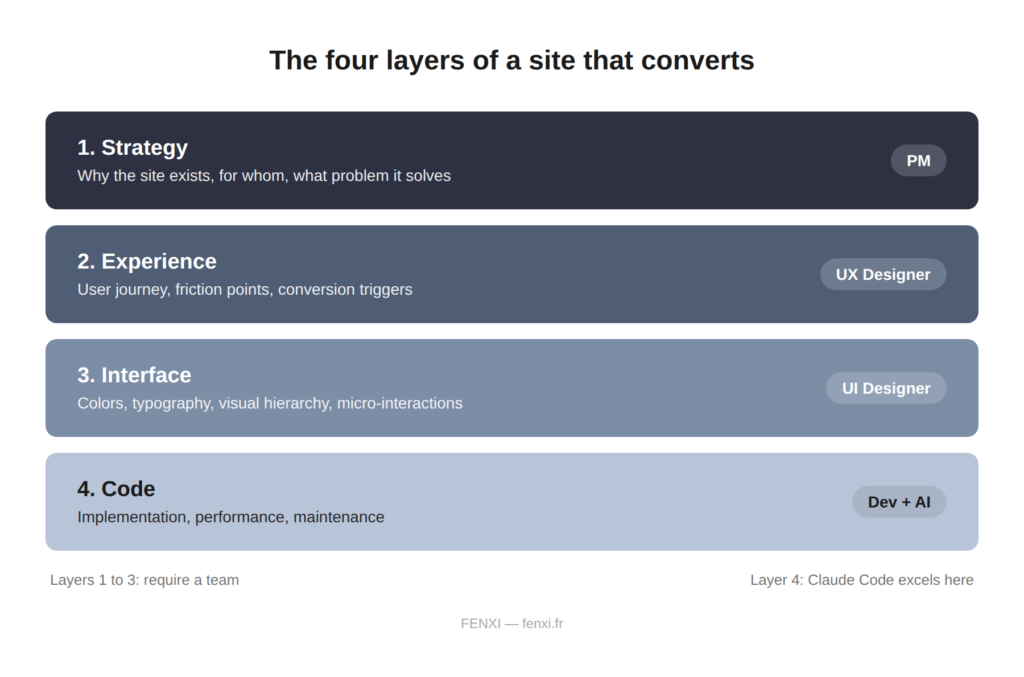
Designing a site rests on four levels. The first is strategy: why the site exists, who it serves, what problem it solves. This is the product manager’s responsibility. The second is user experience: how visitors navigate, where they drop off, what triggers a conversion. This is the UX designer’s responsibility. The third is interface: color palette, typography, visual hierarchy, micro-interactions. This also falls under design. The fourth is code: the technical implementation that allows the site to run quickly and without errors.
Artificial intelligence performs well at this last level. On the first three, it operates by approximation.
A factor rarely mentioned: accessibility
A recent study indicates that 95.9% of sites among the one million most visited display automatically detectable WCAG failures, averaging 56.8 errors per page. Generative AI does not correct these issues by default. Doing so requires an explicit request, addressed point by point, along with verification of the result. Without this step, a portion of visitors is effectively excluded, often without the business being aware of it.
The founder of a SaaS company reduced his bounce rate from 67% to 31% by reworking micro-interactions with accessibility in mind: sound feedback on buttons, transitions that respect reduced-motion preferences. This level of detail does not result from a generic prompt. It results from testing with real users.
When the absence of expert guidance carried a real financial cost
One site that invested 18,000 euros in 3D animations lost 40% of its mobile traffic due to load times, with no corresponding gain in conversions. Another example: a poorly executed « brutalist » design reached an 82% bounce rate and lost 60% of its revenue within three months, due to confusing navigation and text that was difficult to read on mobile.
These outcomes did not result from coding errors. The code worked correctly. They were judgment errors, the kind that five minutes of user testing would have identified.
When AI alone remains a sound choice
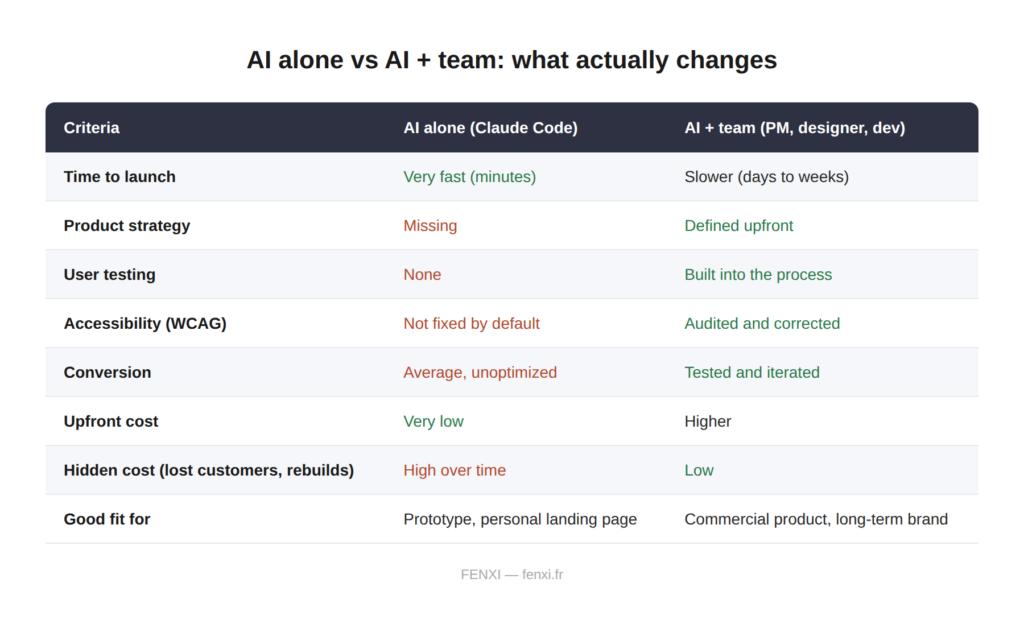
This assessment deserves nuance: certain use cases are well suited to a fully automated approach. A personal landing page, a brochure site with no significant commercial stakes, a disposable prototype built to validate an idea before any further investment. In these cases, the cost of an error remains limited, and execution speed takes precedence over precision.
The calculation changes the moment real conversion is at stake: a product to sell, leads to capture, a brand to build over time. In that context, every percentage point of bounce rate represents a measurable cost.
What a high-performing team looks like in 2026
A UX/UI designer who designs the user journey, tests with real users, and measures the impact of every decision. A product manager who defines the problem before defining the solution. A developer who optimizes performance and maintains the code over time. Artificial intelligence then accelerates execution, once the strategic decisions have been made.
Without these first three roles, AI generates volume. With them, it becomes a genuine production accelerator.
According to recent research, 79% of French SME leaders believe that digital brings real benefits to their business, yet most report lacking the skills needed to fully capture that value. This is precisely the gap between having a website and having a website that delivers a return.
Sources
- BEW Web Agency (2025): Current UX Design Trends
- Forrester Research: studies on the impact of UX on conversion rates
- Adobe: statistics on the impact of design on user engagement
- WebNyxt (2025): 15 Web Design Trends 2025/2026
- ActivMedia (2025): Web Design in 2025
- W3C / WCAG 2.2: Web Accessibility Standards